
This guide provides a comprehensive overview of how to send custom events from a third-party application to a CarePortals webhook endpoint. This process is designed to trigger a corresponding workflow in the CRM Portal, allowing you to automate processes based on external events.
Prerequisites
Before you can successfully send a webhook event, you must have the following information and configurations in place:
- Your Organization Key: You will need the unique key that identifies your organization on the Care Portals platform. This key is required for the API call.
- Workflow Configuration: A workflow must be configured within the CRM Portal to listen for and process the incoming event.
- In the CRM, create a new workflow and set its Trigger Type to
webhook.event. - In the Trigger Filter, define a
__source. This is a custom identifier (e.g.,affiliate,lifefile,sevencells, etc.) that you will use in your API call to link the event to this specific workflow.
- In the CRM, create a new workflow and set its Trigger Type to
To learn more about workflows, refer to the following guides:
- The Workflow Automation Engine (Explanation)
- How to Send a Webhook Using Workflows
Process Flow
The following steps guide you through the process of constructing and sending a custom event to the webhook endpoint.
Step 1: Construct and Send the Webhook Event
To trigger the workflow, your application will send a POST request to the webhook event endpoint.
This request is composed of three key parts:
- Organization Key (
{org}): In the URL path, replace{org}with your unique organization key (org_key). - Source (
{source}): Replace{source}with the custom source name you defined in the workflow trigger's prerequisite step. This value is case-sensitive and must match exactly. The source can be any custom name you define. - Payload (Request Body): The request body must contain a valid JSON object. The structure of this payload is entirely up to you and should contain the data your workflow needs to process the event.
In the example below, we are sending an event from a pharmacy partner named "Lifefile" to signal that a prescription has been shipped. The {org} is set to <ORG_KEY>, and the {source} is lifefile-pharmacy. The JSON payload contains the relevant order and shipping details.
curl -X POST 'https://public-api.portals.care/webhooks/event/<ORG_KEY>/lifefile-pharmacy' \
-H 'Content-Type: application/json' \
-d '{
  "orderId": "ORD-2025-98765",
  "patientId": "pat_cde54321",
  "prescriptionId": "RX-55443322",
  "status": "shipped",
  "shippedAt": "2025-09-22T21:05:00Z",
  "shippingCarrier": "FedEx",
  "trackingNumber": "785111222333"
}'
{
"status": "received",
"organization": "<ORG_KEY>",
"source": "lifefile-pharmacy"
}If the webhook is received successfully, the API will respond with a 201 Created status code and a confirmation object.
Step 2: Verify the Workflow Execution
After the API confirms receipt of the event, the system will automatically trigger the corresponding workflow in the CRM that is listening for your defined source. The JSON payload you sent will be available within that workflow for use in subsequent steps and actions.
If no workflow is configured to listen for the specific source you provide, the API call will still return a 201 success status. However, no automation will be triggered. Ensure your workflow is correctly configured and enabled before sending events.
Workflow Example: Affiliate Conversion Tracking
Here is a practical example of an external affiliate marketing platform sending conversion data to CarePortals.
- Use Case: An affiliate platform needs to notify Care Portals of a new conversion, associating the affiliate's data with a specific order.
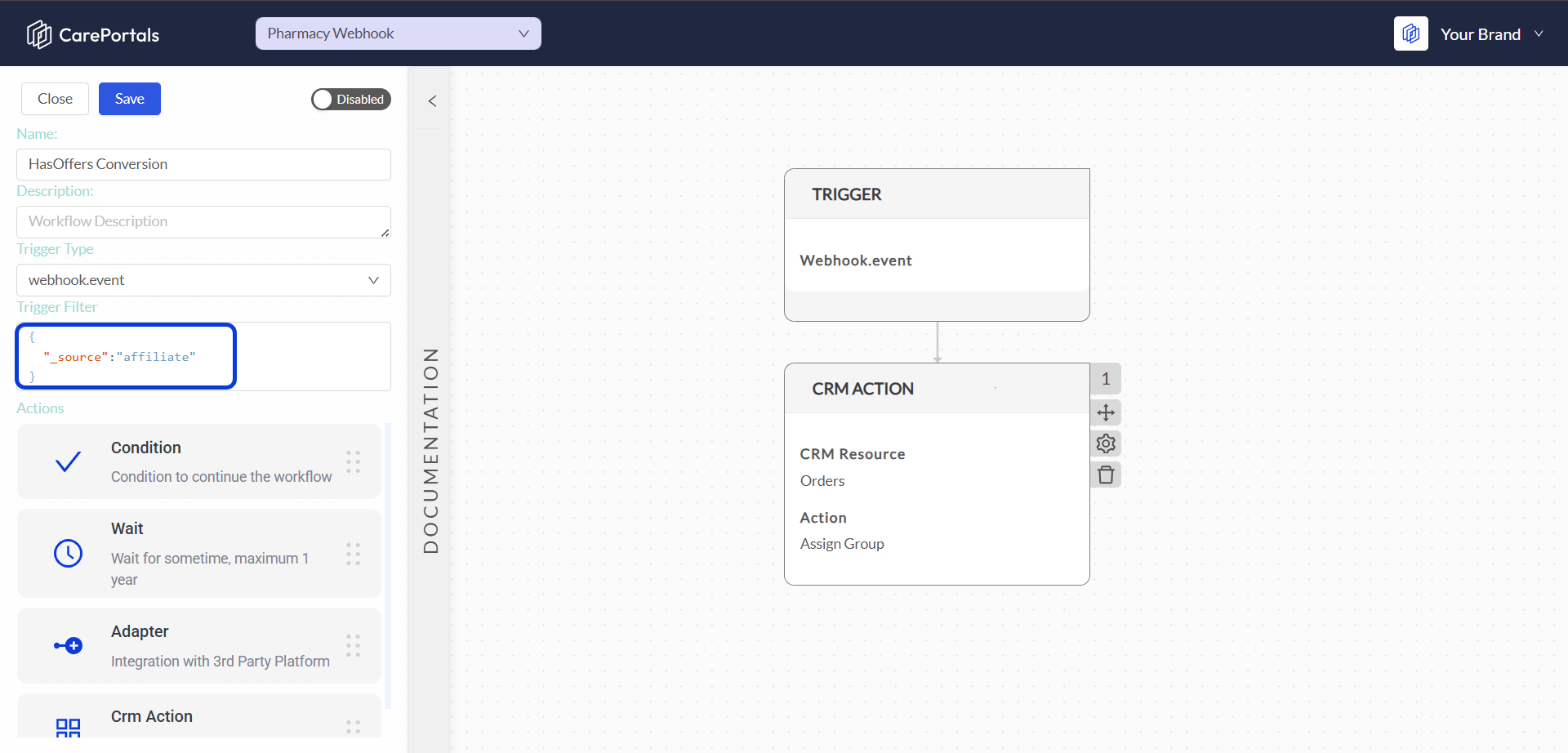
- Prerequisite Setup: A workflow named "HasOffers Conversion" is created in the CRM with the Trigger Filter
sourceset toaffiliate.
- Example API Call:
-
Endpoint URL: The
{org}is replaced with the organization's key (e.g.,org_key), and the{source}isaffiliate. -
Payload: The body contains the specific IDs needed to link the conversion to the order and affiliate.
curl -X POST 'https://public-api.portals.care/webhooks/event/org_key/affiliate' \
-H 'Content-Type: application/json' \
-d '{
  "affiliate_id": "101",
  "transaction_id": "abc-123-def-456",
  "order_id": "CP-789XYZ"
}'
-
- Result: This API call triggers the "HasOffers Conversion" workflow configured in the CRM. The workflow can then access the
affiliate_id,transaction_id, andorder_idfrom the payload to perform actions, such as updating the order record with the affiliate's information.